Content Webhooks for Small SaaS Developers: Start With Two Pipelines

A content webhook is an event-driven HTTP POST that pushes a JSON payload from your CMS to a URL you specify the moment something happens, a publish, an update, a delete. Use them when you need instant reactions to content changes and want to avoid polling. Reach for a standard API instead when you need to run a complex query, backfill historical records, or pull a large batch of data on your own schedule.
TL;DR:
- Webhooks should acknowledge receipt within a few seconds using a
200response to avoid retries and ensure reliable delivery, especially if processing is slow or involves external APIs.- Combining webhooks with API calls—triggering a webhook then fetching full resource details—is the most resilient pattern for maintaining data completeness and accuracy.
- Always verify webhook signatures with your shared secret using raw request bodies and reject deliveries outside a short time window to prevent tampering and replay attacks.
- Starting with simple automations like publish-triggered Slack notifications and search index updates helps small teams learn webhook patterns effectively before expanding to complex automations.
- Reuse delivery logs and store payloads for debugging schema changes or failures, and implement idempotency checks to handle duplicate retries safely.
Table of Contents
- How Content Webhooks Work: Anatomy of a Delivery
- Webhook vs API: When to Push and When to Pull
- Configuring a Webhook: Step-by-Step Checklist
- Security and Validation: Signature Verification and Replay Protection
- Reliability: Retries, Idempotency, Timeouts, and Dead Letter Handling
- Payload Formats and Useful Headers: What to Parse and When to Fetch More
- Common Use Cases and Orchestration Patterns for Content Teams
- Testing, Local Development, and Observability
- Implementation Examples and Receiver Best-Practice Checklist
- Practical Checklist and Crontent Perspective for Small SaaS Teams
- Author Perspective: Practical Recommendation From Jose
- A Managed Alternative for Teams That Don’t Want to Build the Pipeline
- Sources
- FAQ
How Content Webhooks Work: Anatomy of a Delivery
A content webhook starts with a subscription. You register an endpoint URL with your CMS, tell it which events to watch (content.published, content.updated, content.deleted), and the platform stores that subscription alongside a signing secret. From that point on, every matching event triggers an outbound HTTP POST to your URL, no polling loop required.
The delivery itself carries a predictable set of headers, and parsing them correctly matters more than most implementers expect. According to Bird’s webhook documentation, a delivery typically includes:
- A unique delivery or event ID for deduplication and tracing
- A timestamp marking when the event fired
- A signature header for verifying the payload came from the platform
- A
Content-Typeheader, almost alwaysapplication/json
Timing is where a lot of teams get tripped up. Most platforms expect a 2xx response within a few seconds, sometimes as tight as five to ten depending on the provider. If your endpoint hangs, times out, or returns an error, the platform assumes the delivery failed and queues a retry. That retry logic is useful for reliability, but it becomes a liability if your handler does slow, synchronous work before responding. The fix is simple: acknowledge fast, process later. Read the body, validate the signature, and return 200 before you touch a database or call another API.
Webhook vs API: When to Push and When to Pull
Push and pull solve different problems, and conflating them is the most common architectural mistake teams make with content integration webhooks. Webhooks push data to you the instant something changes. APIs wait for you to ask.
Webhooks win when you need immediate reactions and want to cut polling costs. If you’re rebuilding a static site or notifying an editor the second a post goes live, a webhook fires that action in near real time without your server hammering an endpoint every 30 seconds hoping for new data.
APIs still earn their place, particularly for:
- Complex queries that filter, sort, or join data in ways an event payload never will
- Historical backfills or first-time syncs when you need everything, not just what changed today
- Large batch operations where pulling a paginated dataset beats waiting on hundreds of individual events
The most resilient pattern combines both: a webhook fires to tell you something changed, then your handler calls back to the API to fetch the full resource if the payload doesn’t already contain everything you need. This “notify then fetch” approach, sometimes called push and pull, gives you speed without sacrificing completeness.
Configuring a Webhook: Step-by-Step Checklist
Setting up a content webhook follows roughly the same sequence across most CMS platforms, whether you’re working with Contentful, Firstup, or a custom headless setup. According to Bird’s implementation guide, the process breaks down into a handful of concrete steps:
- Choose your endpoint URL and route. Decide where deliveries land, ideally a dedicated route like
/webhooks/contentrather than reusing a general-purpose API endpoint. - Select the events to subscribe to. Most platforms let you scope subscriptions narrowly (
content.publishedonly) instead of firing on every possible event. - Generate a signing secret and store it immediately. Many platforms display this secret exactly once. Save it in an environment variable or secret manager before you navigate away.
- Set
Content-Typetoapplication/jsonand add any custom headers your endpoint needs for authentication, such as an authorization header some platforms require per integration. - Send a test delivery. Nearly every serious platform includes a “send test event” button. Use it before you trust the integration with production traffic.
- Enable delivery logs. These logs become your primary debugging tool once things go wrong in production, showing you respond codes, latencies, and retry attempts.
Platforms like Firstup document subscription attributes like url, authorization_header, events, and an active or paused toggle, which is a useful mental model even if you’re building against a different CMS. The shape tends to repeat across vendors.
Pro Tip: Create a separate webhook subscription for staging and production with different secrets. It sounds obvious until you’ve debugged a signature mismatch caused by a shared secret leaking test traffic into your production logs.
Security and Validation: Signature Verification and Replay Protection
Every content webhook payload should be treated as untrusted until proven otherwise, and signature verification is how you prove it. The standard workflow uses HMAC-SHA256: the platform signs the raw request body with your shared secret, sends the resulting signature in a header, and your endpoint recomputes that signature independently to confirm the payload wasn’t forged or tampered with in transit.
A growing number of platforms follow the Standard Webhooks specification, which standardizes header names and the signing recipe. That matters more than it sounds, because it means you can write one verification routine and reuse it across multiple integrations instead of hand-rolling a custom check for every vendor.
A few practices separate a secure implementation from a vulnerable one:
- Always verify against the raw request body, not a parsed and re-serialized version. Re-serializing JSON can subtly change byte order and break the signature check.
- Reject any delivery whose timestamp falls outside a short acceptance window, typically five minutes. This blocks replay attacks where an attacker captures a valid payload and resends it later.
- Store secrets in environment variables or a dedicated secret manager, never hardcoded in source control.
- When rotating a signing secret, accept both the old and new secret during a brief overlap window so in-flight deliveries don’t fail during the transition.
Pro Tip: Log rejected signatures with enough detail to debug them, but never log the secret itself. A verification failure usually means a stale secret or a body that was modified by middleware before it reached your handler, and you’ll want the timestamp and header values to figure out which.
Reliability: Retries, Idempotency, Timeouts, and Dead Letter Handling
Delivery isn’t guaranteed on the first attempt, and building for that reality separates a fragile integration from a durable one. Providers generally retry failed deliveries using exponential backoff, spacing out retry attempts progressively rather than hammering your endpoint repeatedly in a tight loop.
The status code your handler returns determines what happens next. A 4xx response usually tells the platform something is permanently wrong (bad payload, expired subscription) and retries stop. A 5xx or timeout signals a transient failure, and most platforms will keep retrying on a schedule for a period ranging from hours to a few days depending on the provider.
That retry behavior makes idempotency non-optional. If a delivery fires twice, whether due to a retry or a network hiccup, your handler needs to recognize the duplicate and skip reprocessing it. Practical patterns include:
- Store each processed delivery ID (or event ID) in a database or cache, and check it before acting on a new delivery.
- Return
2xxas soon as you’ve validated and enqueued the event, then do the actual work asynchronously in a background worker or queue. - Set a reasonable timeout on your own handler logic so a slow downstream call doesn’t block your acknowledgment.
- Log deliveries that exhaust all retries into a dead letter queue, and build a simple replay mechanism so you can reprocess them once the underlying issue is fixed.
Bird’s guidance on webhook reliability notes that error codes and retry schedules vary by provider, so check your specific platform’s documentation for exact retry windows and which status codes it treats as permanent failures versus temporary ones. Don’t assume every CMS behaves identically here. A dead letter queue you never check is just a slower way to lose data, so build the replay path before you need it, not after a support ticket forces the issue.
Payload Formats and Useful Headers: What to Parse and When to Fetch More
Most content webhook payloads follow a predictable envelope shape, even when field names differ slightly between platforms. You’ll typically find a type field identifying the event, a resource ID, a timestamp, and a nested data or object field carrying the actual content payload.
The decision that trips people up is whether to trust the embedded payload or fetch the full resource separately. A few guidelines:
- If the payload includes everything your handler needs (title, slug, status), act on it directly and skip the extra network call.
- If the event only signals that something changed without the full resource, or if you suspect the payload might be stale by the time you process it, call back to the platform’s API to fetch the current state.
- Large content bodies, media assets, or deeply nested relational data are often omitted from the payload intentionally to keep deliveries lightweight, which means an API fetch is the only reliable way to get them.
Beyond the payload body, the headers carry information worth capturing even if your handler doesn’t act on them immediately. A delivery ID and timestamp, as Bird’s documentation notes, let you deduplicate retried events and trace a specific delivery through your logs when something goes wrong three retries later. Store them alongside your processed record, not just in a transient log line that rotates out in a week.
Common Use Cases and Orchestration Patterns for Content Teams
The real payoff of content webhooks isn’t any single automation, it’s chaining several of them off one publish event so your systems stay synchronized without a human touching a deploy button. A single content.published event can fan out into multiple parallel tasks:
- Trigger a static site rebuild or CDN purge so the published change goes live immediately instead of waiting on a cached version to expire.
- Update your search index so newly published or edited content becomes findable without a separate manual reindex step.
- Notify your team in Slack or Teams, routed conditionally by content type so a blog post alert doesn’t flood the same channel as a product update.
- Sync to downstream distribution channels, syndicating content to partner platforms or social scheduling tools automatically.
Cosmic’s writeup on webhook-driven orchestration describes this as chaining automations with per-task error handling, running each downstream action independently so a failed Slack notification doesn’t block your search index from updating. That independence matters: a single point of failure shouldn’t take down four unrelated automations.
For a small team looking at their first orchestration setup, resist the urge to wire up everything at once. Start with the two or three actions that actually save you manual work today, notify plus reindex is a common starting pair, and expand from there once you trust the retry and error handling. Teams comparing webhook and API patterns for their integrations often find the orchestration layer is where the real time savings show up, not the individual webhook itself.
Testing, Local Development, and Observability
You should never point a content webhook at a production endpoint for the first test. GitHub’s own webhook documentation recommends using proxy tools like smee.io or Beeceptor during local development, which forward real deliveries to your local machine without exposing it directly to the internet.
Most CMS platforms also ship a built-in “send test event” feature that fires a synthetic payload without waiting for a real content change. Use it constantly during development, and again after any change to your handler logic.
Once you’re in production, observability is what keeps small problems from becoming outages:
- Review delivery logs regularly, not just when something breaks. Rising latency is often an early warning sign before failures start.
- Set alerts on failure rate, not just total failures, since a spike from 1% to 8% matters more than raw counts.
- Simulate edge cases deliberately: malformed payloads, expired signatures, duplicate deliveries. Most platforms let you replay events from their logs, which is the fastest way to test a bug fix against real historical data.
Pro Tip: Keep a small folder of captured real payloads from your delivery logs. When a provider changes their event schema (and eventually one will), you’ll have concrete before-and-after examples instead of guessing what broke.
Implementation Examples and Receiver Best-Practice Checklist
A well-built webhook handler follows the same shape regardless of language or framework. The pattern GitHub recommends, and one that holds up across most content platforms, breaks into two distinct phases.
The handler (fast path):
- Read the raw request body before any framework middleware parses or transforms it, since signature verification depends on the exact bytes sent.
- Verify the signature using your stored secret and reject anything that fails immediately.
- Check the delivery ID against your processed record to catch duplicates before doing any work.
- Enqueue the validated event onto a background job queue.
- Return
2xxas soon as the event is queued, not after processing completes.
The worker (slow path):
- Dequeue the event and perform the heavier work: calling back to the API for full resource data, updating a search index, triggering a rebuild.
- Handle failures within the worker independently, with its own retry logic separate from the platform’s delivery retries.
A few practical notes worth building in from day one: set a reasonable timeout on any outbound calls your worker makes, cap concurrency so a burst of deliveries doesn’t overwhelm a downstream API’s rate limit, and log worker failures with enough context to debug without replaying the entire event.
Practical Checklist and Crontent Perspective for Small SaaS Teams
If you’re a solo founder or a two-person SaaS team, don’t try to wire up every automation on day one. Start with a single high-value pipeline, publish triggers a search index update, or publish triggers a Slack notification, and get that one working reliably before adding the next.
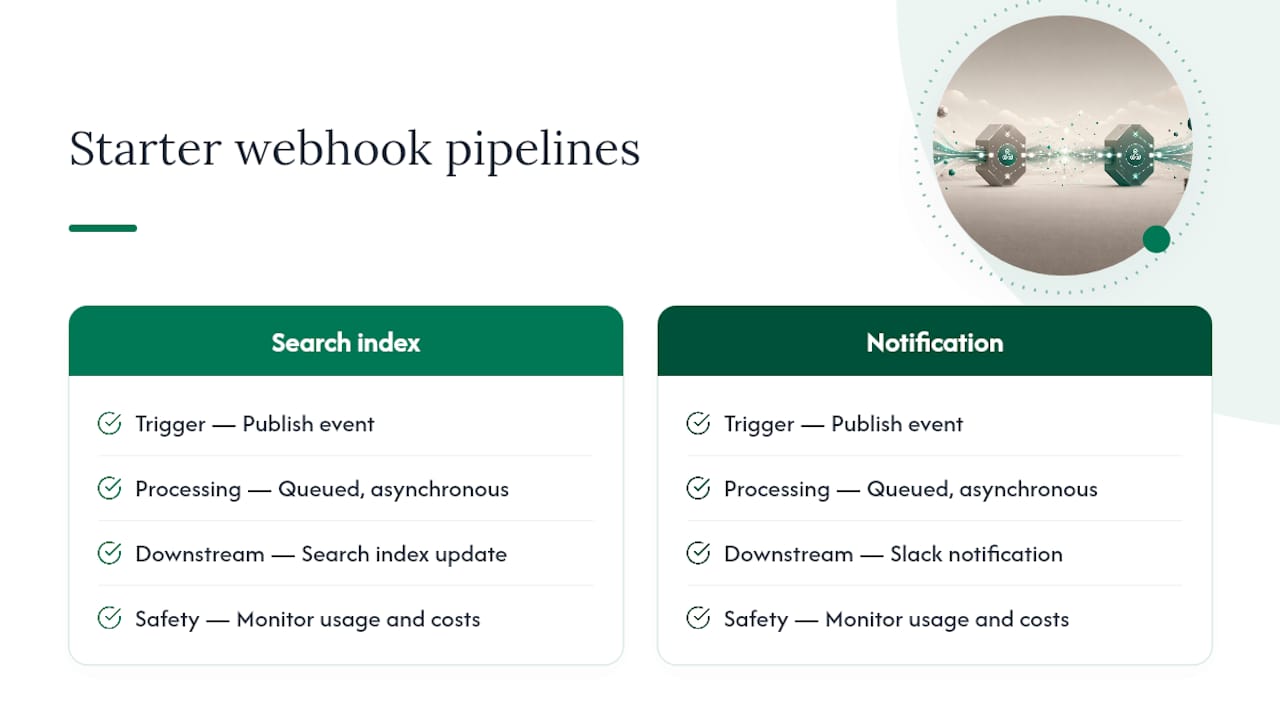
Monitor your usage as you scale up. Webhook-driven automations that call paid APIs downstream (search indexing services, CDN purges with rate limits) can rack up unexpected costs if a bug causes a retry storm. Queued, asynchronous processing isn’t just about reliability, it’s also your safety valve against runaway costs when something misfires.
A few habits worth adopting early: keep your delivery logs long enough to debug a problem that surfaces days later, build the dead letter replay path before you need it, and treat your first webhook integration as the template you’ll copy for the next three. The teams that struggle later are usually the ones who skipped idempotency checks on their first build because “it’s just one automation.”
Author Perspective: Practical Recommendation From Jose
If you’re setting up your first content webhook, start with publish triggering a Slack notification plus a search index update. It’s low risk, the failure mode is obvious (nobody gets pinged, search stays stale), and it teaches you the retry and signature patterns you’ll reuse everywhere else.
Don’t treat webhooks as a replacement for your API. The payload rarely has everything, and the moment you assume it does, you’ll ship a bug the first time a provider trims a field to keep deliveries lean. Pairing a webhook trigger with an occasional API fetch costs you one extra network call and saves you from building your entire pipeline on an assumption that happens to work today.
— Jose
A Managed Alternative for Teams That Don’t Want to Build the Pipeline
Everything above assumes you’re building and maintaining the webhook handlers yourself, which is the right call for teams with the engineering bandwidth to own that infrastructure. But if you’re a solo founder shipping product features and marketing content at the same time, standing up queues, dead letter handling, and signature verification for a content pipeline is real engineering time you might not have to spare.

A managed platform can provide scheduled, research-backed blog posts, LinkedIn posts, social media posts, and video scripts delivered on a publishing cadence you set, with webhook and API integration available so delivery slots into your existing pipeline. Every draft comes source-cited and styled to match your voice, so you’re not stuck cleaning up generic output before it can go out. If your team already has content delivery triggers wired up and just needs a steady, credible supply of drafts feeding into them, start with a free trial content run and see how it fits your existing workflow.
Sources
For provider-specific details, these docs cover the mechanics referenced throughout this guide: Bird’s webhook documentation covers event catalogs, signing recipes, and retry policy. GitHub’s delivery handling guide details local testing with proxies and asynchronous processing patterns. Firstup’s webhook docs show real subscription attributes like authorization headers and event scoping. Always check your specific CMS’s documentation for exact retry windows and header names, since these vary by provider.
- Webhooks & events · Docs — Bird
- Handling webhook deliveries — GitHub Docs
- Automated Content Sharing webhooks — Firstup
- Webhook-driven content orchestration — Cosmic
FAQ
What Are Examples of Content Webhooks?
Common examples include a CMS firing a webhook when a post publishes to trigger a static site rebuild, a CDN purge on content update, a search index refresh, or a Slack notification when an editor submits a draft for review.
What Is the Purpose of a Content Webhook?
The purpose is real-time notification: instead of your system polling a CMS repeatedly to check for changes, the CMS pushes an event to you the instant something happens, cutting latency and unnecessary API calls.
What Is the Difference Between a Webhook and an API?
A webhook pushes data to you automatically when an event occurs, while an API waits for you to make a request and pull data on demand. Most robust integrations, including webhook-driven content orchestration, use both together.
Are Webhooks Free?
Webhooks themselves are typically a free feature included with most CMS and SaaS platform plans, though the infrastructure you build to receive and process them, servers, queues, downstream API calls, carries its own cost. Check your specific platform’s pricing page for any usage-based limits on webhook volume.
Does Crontent Support Webhook Integration?
Yes. Crontent supports webhook and API integration so scheduled content drafts can be delivered into your existing pipeline rather than requiring a separate manual handoff.