One Anchor Post and 3 Snippets Weekly: Content Calendar for Startups

Start with one low-cadence, high-signal calendar: one anchor post plus three repurposed social snippets a week, tracked on a single Google Sheet or Notion board. Copy a starter template today, fill in the next four weeks, and publish your first anchor piece before adding any new tools or hires. That’s the whole system for now.
TL;DR:
- A startup content calendar should include core columns like publish date, platform, content type, owner, status, and CTA, with optional fields added later as needed.
- A four-week planning horizon with one anchor post per week and three repurposed snippets is sustainable, requiring two to four hours weekly for solo founders.
- Content pillars should be tied to product milestones such as launches or feature updates, not abstract themes, to ensure relevance and timeliness.
- Weekly reviews focused on three key metrics—sign-ups, demo requests, or engaged readership—are essential for measuring performance and guiding adjustments.
- Using templates from Notion, Canva, Asana, or HubSpot helps startups quickly set up and adapt their calendars without overcomplicating or losing momentum during pivots.
Table of Contents
- What Is a Content Calendar for Startups, and Why Does It Matter?
- Key Elements to Include in Your Startup Content Calendar
- Starter Templates and Copy-Ready Resources
- Step-by-Step: Set Up a Calendar That Survives Startup Reality
- Common Mistakes and a Weekly Checklist to Keep Momentum
- Why This Approach Works: Crontent and Jose’s Experience
- Integrating the Content Calendar With Marketing and Sales Goals
- Measuring Content Performance and Iterating the Calendar
- Collaborating and Assigning Roles Within the Startup Team
- Adapting the Content Calendar During Startup Pivots or Rapid Changes
- Author Perspective: Founder-Led Content and When to Scale
- Crontent: Automate the Drafts Without Losing Your Voice
- Authoritative Templates and How-To Pages to Copy Now
- Sources
- FAQ
What Is a Content Calendar for Startups, and Why Does It Matter?
A content calendar is a planning document that lists posts by date, platform, format, and status, usually laid out as a calendar grid or a simple table, according to Worcester State University’s social media guide. It differs from a broader editorial plan, which sets strategy and pillars; the calendar is the execution layer that turns that strategy into dated, assigned work.
For a startup, this matters for reasons bigger companies don’t deal with:
- Consistency without a team. One founder juggling product, sales, and content needs a system that doesn’t rely on memory.
- Product-aligned storytelling. A calendar lets you time posts around launches, pivots, and roadmap news instead of publishing generic filler.
- Repurpose leverage. Every long-form piece can become five smaller assets, and a calendar is where you track that instead of losing it.
Skip the calendar entirely if you have no product to talk about yet, or genuinely zero hours to publish. Building a calendar you can’t execute wastes more time than having none.
Key Elements to Include in Your Startup Content Calendar
Keep the field list short enough that updating it takes minutes, not a meeting. Every startup calendar needs these core columns:
- Publish date — the day content goes live, not the day it’s drafted.
- Platform — blog, LinkedIn, X, newsletter, and so on.
- Content type — anchor post, snippet, thread, video script.
- Headline or topic — a working title so anyone can scan the plan.
- Owner — who writes, reviews, and posts it.
- Status — idea, drafting, review, scheduled, published.
- CTA — what you want the reader to do next.
- Asset link — a link to the doc, image, or draft itself.
Add optional columns only if you’ll actually use them: repurpose notes (which anchor this came from), a goal metric (sign-ups, demo requests), and an experiment tag for anything you’re testing.
Pro Tip: Resist the urge to build a 20-column tracker in week one. A bloated template is the fastest way to abandon a calendar by week three. Add a field only after you’ve missed it twice.
Starter Templates and Copy-Ready Resources
You don’t need to build a template from scratch. A few sources cover most startup needs:
- Notion offers a wide range of content calendar templates built around databases, which suit teams that want tasks and content living in one workspace.
- Canva provides a free social media calendar with calendar, Kanban, and sheet views, useful if you’re also designing assets in Canva.
- Asana has a social media calendar template built for task ownership, a good fit once you have two or more people touching content.
- HubSpot built a social media calendar template aimed specifically at startups, with fields already scoped for early-stage teams.
Solo founders should pick Notion or a plain sheet: one row per idea, a calendar view layered on top, nothing else. Teams of three or more benefit from Asana’s task assignment. Choose based on what tool your team already opens daily, not which template looks the most polished.
Step-by-Step: Set Up a Calendar That Survives Startup Reality
You can build a working calendar in one afternoon. Here’s the order that actually holds up once real work starts piling on.
- Pick a planning horizon of 4 to 12 weeks. Anything longer gets stale fast in a startup, since priorities shift with funding, launches, and customer feedback. Four weeks suits pre-launch teams; twelve suits startups with a steadier product cadence.
- Decide your cadence before you decide your topics. A workable starting rhythm is one long-form anchor plus a few short social posts a week, which practitioner guidance on early-stage publishing points to as a sustainable baseline. That’s roughly two to four hours a week for a solo founder, most of it spent on the anchor.
- Define three to five content pillars tied to product milestones, not abstract themes. Tie each pillar to something concrete: a feature launch, a customer story, a pricing change, a lesson from building the product. Guides on startup marketing calendars consistently recommend anchoring content to campaigns and milestones rather than publishing disconnected posts.
- Plan repurposing slots and assign owners before you write anything. Decide in advance that Monday’s anchor becomes Tuesday’s LinkedIn post, Wednesday’s X thread, and Friday’s newsletter blurb. Assign a name to each slot, even if that name is you.
- Set three metrics and a short weekly review. Track something like sign-ups influenced, demo requests, and engaged readership, then spend 15 to 30 minutes each week checking what moved and what to cut.
Pro Tip: Block the weekly review on your calendar as a recurring event, not a “when I get to it” task. Calendars die from neglect, not from bad templates.
Common Mistakes and a Weekly Checklist to Keep Momentum
Most startup calendars fail for the same handful of reasons. Founders plan five posts a week when they can barely sustain two, hand content off to a freelancer before the voice is established, skip assigning an owner to each item, or treat repurposing as an afterthought instead of a built-in step.
Run this five-item check every week:
- Prioritize: pick the two or three pieces that matter most this week.
- Assign: confirm who’s writing, reviewing, and posting each one.
- Repurpose: pull at least two snippets from your last anchor.
- Publish: hit the dates you committed to, even if the post is shorter than planned.
- Review: check your three metrics for 15 minutes and adjust next week’s plan.
| Mistake | Quick fix |
|---|---|
| Planning too much volume | Cut to one anchor + repurposed snippets per week |
| Outsourcing before voice is set | Write the first 8 pieces yourself |
| No named owner per item | Add an owner column and fill it before the week starts |
| Repurposing skipped | Build repurpose slots into the calendar, not as a separate task |
If a week slips entirely, don’t try to catch up by doubling next week’s output. Publish what’s ready, skip what isn’t, and get back to your normal cadence immediately.
Why This Approach Works: Crontent and Jose’s Experience
Jose has written extensively on early-stage content workflows, including pieces on what content a small SaaS team should create first and how to turn product updates into content people trust. The pattern across that work is consistent: founders who publish consistently, even at low volume, build more credibility than founders who go quiet between bursts.
Crontent’s own workflow reflects this. Every draft is synthesized from current, full-length sources and prompts the founder for their actual take before writing, keeping the source-backed, repurpose-first approach intact rather than producing generic filler. A founder could run one anchor post through Crontent, get source-cited drafts for the repurposed snippets, and spend review time on edits instead of blank-page writing.
Integrating the Content Calendar With Marketing and Sales Goals
A content calendar that lives apart from your marketing and sales targets turns into busywork fast. Tie each pillar directly to a stage in your funnel: awareness content explains the problem you solve, consideration content compares approaches or shows your product in use, and conversion content addresses objections sales hears on calls.
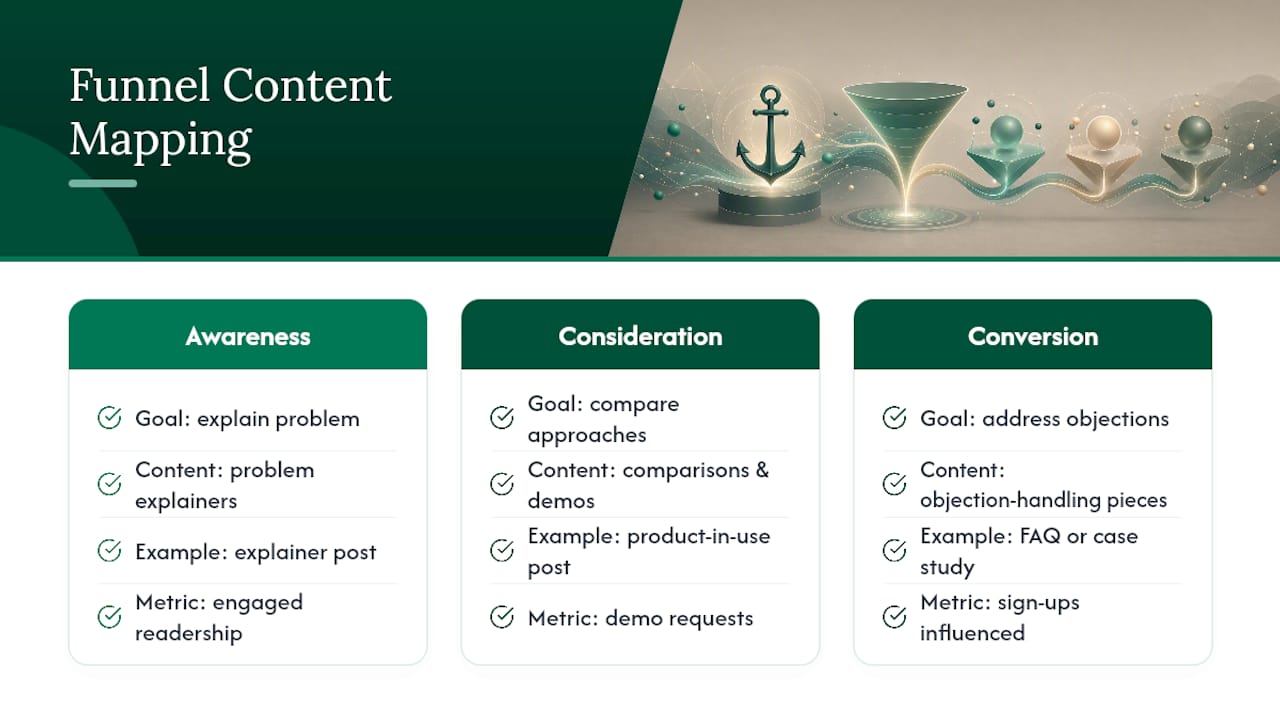
Talk to whoever runs sales conversations, even if that’s also you, and ask what questions come up most. Turn the three most common ones into calendar items. This closes the loop between what customers actually ask and what you publish, instead of guessing at topics in isolation.
Startup calendars work best when tied to product milestones and measured against a small metric set, such as sign-ups influenced, demo requests, and engaged readership, rather than vanity numbers like impressions. Set those metrics before you publish, not after, so you know what “working” looks like from week one.
Mark launch dates, pricing changes, and major feature releases on the calendar first, then build content around them. A launch post, a customer FAQ addressing the change, and a follow-up case study weeks later cover most of what sales needs without inventing new topics from scratch. If your sales team is closing deals around a specific objection, that objection becomes next week’s anchor post topic. The calendar becomes a shared document between founder and any early sales hire, not a marketing-only artifact sitting in a separate tool.
Measuring Content Performance and Iterating the Calendar
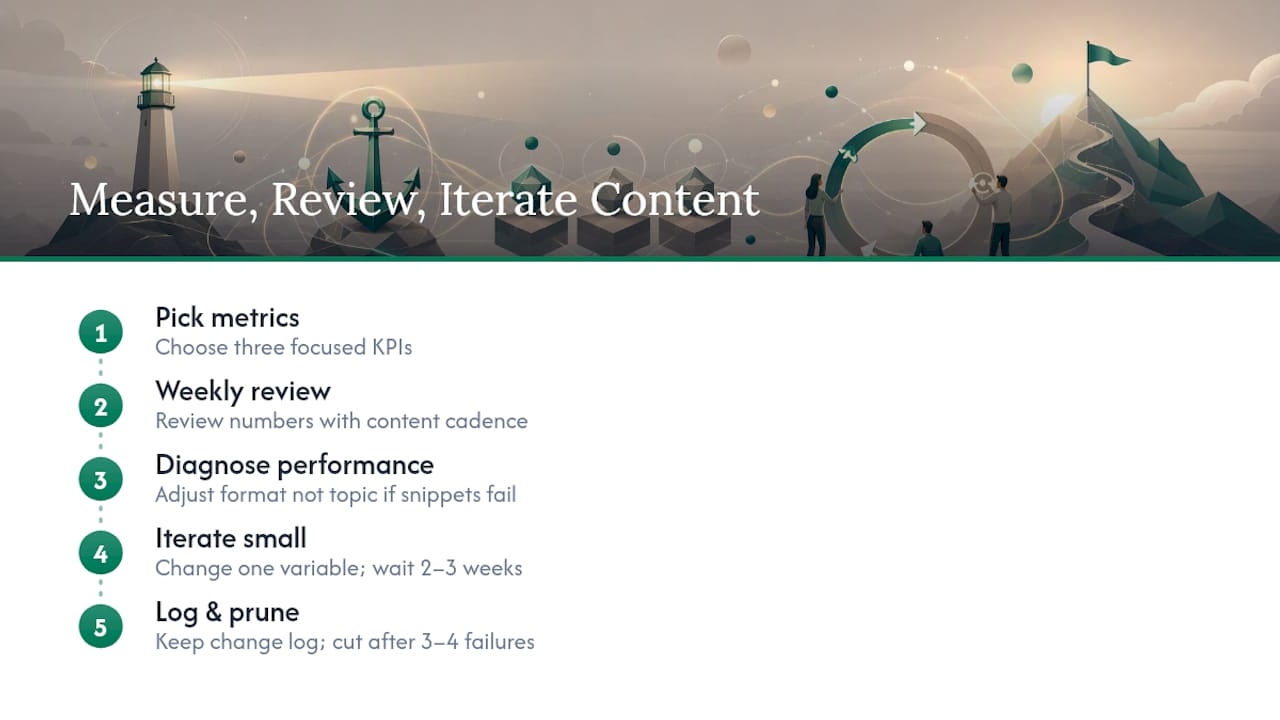
Pick three metrics before you publish anything, and resist the temptation to track everything your analytics tool offers. Sign-ups influenced by a specific post, demo requests tied to a CTA, and engaged readership (time on page, return visits, or reply rates on social) tell you more than raw view counts ever will.
Review these numbers on the same weekly cadence as your content review, not in a separate monthly ritual that’s easy to skip. If an anchor post drives demo requests but its repurposed snippets get no engagement, that’s a signal to change the snippet format, not necessarily the topic. If a pillar consistently underperforms across three or four attempts, cut it rather than forcing a fifth try.
Iteration works best in small steps. Change one variable at a time, whether that’s posting time, headline style, or platform mix, and give it two to three weeks before judging results. Startups that change everything at once after one bad weekend up with no clear read on what actually moved the needle. Guidance on aligning content with SEO and distribution makes a similar point: consistent measurement against a stable process beats sporadic overhauls.
Keep a simple log next to your calendar, even a single column, noting what you changed and when. Six months in, that log tells you more about what works for your specific audience than any general best-practice guide, including this one.
Collaborating and Assigning Roles Within the Startup Team
A calendar with no owner column is a wish list, not a plan. The moment you add a second person to content work, whether that’s a cofounder, an early hire, or a freelancer, assign explicit roles: who drafts, who reviews, who schedules, and who repurposes.
For a two-person team, a workable split is one person handling the anchor content while the other handles repurposing and scheduling. For three to five people, add a reviewer role separate from the drafter, even if that review takes ten minutes. The point isn’t bureaucracy; it’s making sure no post sits in limbo because two people assumed the other would publish it.
Use the status column in your calendar as the single source of truth for where each piece stands. “Drafting,” “in review,” “scheduled,” and “published” should mean the same thing to everyone on the team, so nobody has to ask in a group chat whether something already went out. A repurposing playbook works the same way: define once who turns the anchor into snippets, and that becomes a standing role rather than a conversation every week.
Weekly stand-ups don’t need a dedicated meeting. A 15-minute async check-in, even just comments on the calendar itself, covers what’s stuck and what’s ready. As the team grows, formalize the handoff sequence from draft to review to schedule to repurpose, so voice and quality stay consistent even as more people touch the pipeline.
Adapting the Content Calendar During Startup Pivots or Rapid Changes
Startups pivot, and calendars built around a specific product or message become obsolete overnight when that happens. Treat your calendar as disposable in its details but durable in its structure. The columns, the cadence, the review rhythm can survive a pivot even when every planned topic gets scrapped.
When a pivot hits, pause new content creation for a few days rather than continuing to publish on the old message. Clear the next two to four weeks of planned topics and rebuild pillars around the new direction before scheduling anything new. Publishing stale positioning after a pivot confuses the exact audience you’re trying to win over.
Rapid growth phases need the opposite adjustment: more hands touching the calendar, which means the owner and status columns matter more, not less. If you’re raising a round, expect content demands to spike around the announcement, and plan a short burst of higher cadence around that specific window rather than permanently raising your baseline output.
The core lesson: rebuild your pillars and topics after a major change, but keep your operating system, the calendar format, the review cadence, and the repurposing workflow, exactly as it was. Startups that redesign their entire content process every time strategy shifts spend more time rebuilding tools than actually publishing.
Author Perspective: Founder-Led Content and When to Scale
Founders should write their own initial posts to establish a real voice. That’s how a real voice gets established before anyone else touches the pipeline. Signals it’s time to bring in help: you’re skipping weeks, repurposing never happens, or review has become the bottleneck. When that happens, hand off drafting first and keep review and final voice checks for yourself.
— Jose
Crontent: Automate the Drafts Without Losing Your Voice
Crontent gives you the source-backed drafting and repurposing your calendar needs, without asking you to hand off your voice to a generic content mill. Instead of staring at a blank document every week, you get scheduled drafts built from real research, tied to your actual product updates, and shaped around the takes you’ve already shared.

Here’s what that looks like in practice for a startup running the calendar structure covered above:
- Scheduled, source-cited drafts for your anchor post and its repurposed snippets, so the weekly rhythm doesn’t depend entirely on your free time.
- Repurposing prompts that turn one long-form piece into social-ready posts automatically, matching the pipeline described earlier in this piece.
- Brand-voice preservation through user steering, so drafts reflect your positioning instead of sounding like every other SaaS blog.
The service offers different plans, including options with a free trial on your first content run so you can see the drafts before committing to anything. If your calendar has stalled because writing takes longer than running the company, start a trial at Crontent and see what a source-backed draft looks like next to your own outline.
Authoritative Templates and How-To Pages to Copy Now
A handful of pages cover nearly everything a startup needs to get a calendar running today:
- Notion’s content calendar template collection, best for teams that want databases and task tracking combined.
- Canva’s social media calendar guide, best for teams designing their own visual assets.
- Asana’s social media calendar template, best once a team needs shared task ownership.
- HubSpot’s startup-focused social media template, built specifically with early-stage fields in mind.
Copy whichever matches your current tool stack rather than switching platforms just to adopt a new template.
Sources
- How to Create a Social Media Content Calendar
- Social media calendar: Free templates and how-to guide
- Content Calendar templates
- Social Media Content Calendar Template for Startups
- Free Social Media Calendar Template for Marketing Teams
FAQ
What Should a Content Calendar Include?
At minimum, a content calendar needs publish date, platform, content type, headline or topic, owner, status, and a CTA, according to guidance from Worcester State University. Startups can add optional fields like repurpose notes or a goal metric, but the core seven columns cover most needs without overcomplicating the sheet.
What Is the Best Content Calendar for a Startup?
The best format depends on team size and workflow: Notion suits teams wanting integrated databases, Canva suits teams building visual assets, and Asana suits teams needing task assignment across two or more people. For a solo founder, a simple sheet or Notion board with one row per idea usually beats a heavier project management tool.
Can You Give an Example of a Content Calendar for Startups?
A minimal example: Monday’s anchor blog post, repurposed into a LinkedIn post Tuesday, an X thread Wednesday, and a newsletter blurb Friday, each row tracking date, platform, owner, and status. Tools like Crontent can generate the anchor draft and its repurposed snippets from the same source material, keeping the cadence consistent without extra writing time.
How Do I Create a Monthly Content Calendar?
Start by picking a four-week planning horizon, then set a cadence such as one anchor post plus three short posts weekly. Define three to five content pillars tied to product milestones, assign an owner to each item, and schedule a short weekly review to check three performance metrics.
How Often Should a Startup Post Content?
A sustainable starting cadence is one long-form anchor piece plus three short repurposed posts per week, which practitioner guidance on early-stage publishing points to as a workable baseline. Solo founders should expect this to take two to four hours weekly, most of it on the anchor piece itself.