30–60s Short SaaS Video Scripts That Convert for Small Teams

Use the hook, problem, solution, proof, call-to-action arc, and keep it under 60 seconds. A cold-traffic ad or micro-pitch should run about 30 seconds and 75 spoken words; a homepage or organic short can stretch to 60 seconds and roughly 150 words. Close on a free trial or self-serve signup rather than a demo request when the audience is cold. That single structure, paired with the right runtime, is what most short SaaS video scripts get wrong, and what fixing first will do more for conversions than any editing software.
TL;DR:
- Cold SaaS ads should be limited to around 30 seconds, focusing on a pain point and a clear call-to-action for free trial signups.
- The optimal script structure follows five beats: hook, problem, solution, proof, and CTA, with specific timing for each segment.
- Most scripts contain about 75 words in 30 seconds or 150 words in 60 seconds, emphasizing concise, impactful messaging.
- Visuals should match narration, with on-screen captions crucial for silent autoplay platforms like TikTok and Shorts.
- Small teams can produce multiple versions from a single script by trimming content and adjusting visuals for different platforms, maintaining speed over polish.
Table of Contents
- What Is the Best Short Video Script Structure for SaaS?
- How Long Should a SaaS Video Script Be?
- Ready-to-Use SaaS Video Script Templates
- How to Adapt One Script for TikTok, Shorts, and LinkedIn
- Common Mistakes in Short SaaS Scripts and How to Fix Them
- Turning a Script Into a Storyboard Small Teams Can Actually Shoot
- Tools and Workflow for Small Teams Writing Scripts at Scale
- Three Short SaaS Scripts You Can Copy Today
- Priorities for Solo Founders Writing Their Own Scripts
- Get Research-Backed Scripts on a Schedule With Crontent
- Sources
- FAQ
What Is the Best Short Video Script Structure for SaaS?
The five-part arc, hook, problem, solution, proof, call-to-action, shows up across nearly every practitioner guide on SaaS video script writing because it maps to how a skeptical viewer actually decides whether to keep watching. Each beat has a job, and in a 30 to 90-second script none of them can run long.
The hook’s only job is qualification. Instead of naming the product, describe the manual, painful workflow the viewer does by hand right now, the spreadsheet they rebuild every Monday, the Slack thread they scroll for an hour. That specific pain filters out the wrong viewer in the first two seconds and pulls the right one in. Skipping straight to features here is the single most common reason short scripts underperform.
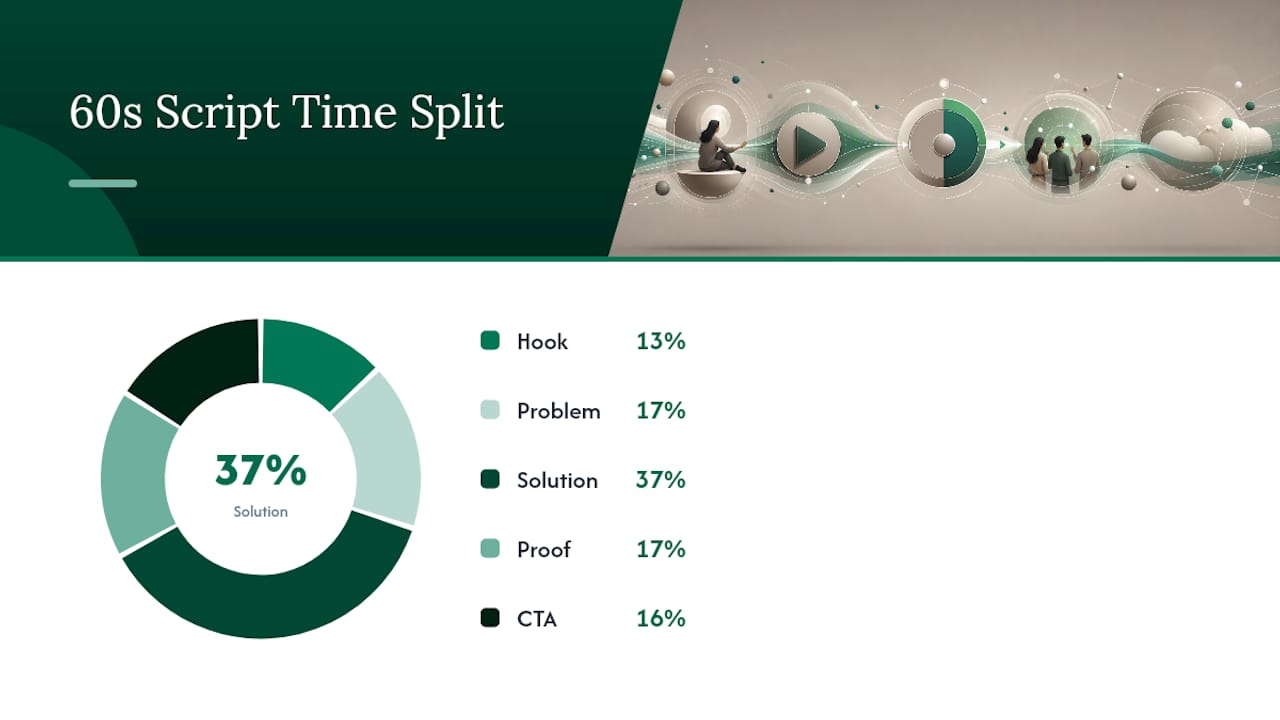
The problem beat expands that pain slightly, one sentence, no more. The solution beat introduces the product doing the thing the viewer just recognized as annoying. Proof compresses to one number or one short line, not a paragraph of testimonial. And the CTA, for cold audiences, should point at a free trial or self-serve signup, since demo requests convert better with warmer, already-qualified leads rather than someone seeing your brand for the first time.
Here’s how the timing typically breaks down in a 60 second script:
- Hook: 0 to 8 seconds, pain-first, no branding yet
- Problem: 8 to 18 seconds, one sentence expanding the pain
- Solution: 18 to 40 seconds, the product doing the job
- Proof: 40 to 50 seconds, one metric or one line
- CTA: 50 to 60 seconds, trial or signup, not a demo
Pro Tip: Write the hook last. It’s easier to nail the two-second pain line once you already know exactly what the solution and proof sections are going to say.
How Long Should a SaaS Video Script Be?
Runtime decisions come down to where the video lives and how cold the audience is, not personal preference. Most SaaS explainer and demo videos perform best between 60 and 120 seconds, and pushing a complex product into one long video usually backfires. Split it into a short series instead, each video targeting one outcome for one role.
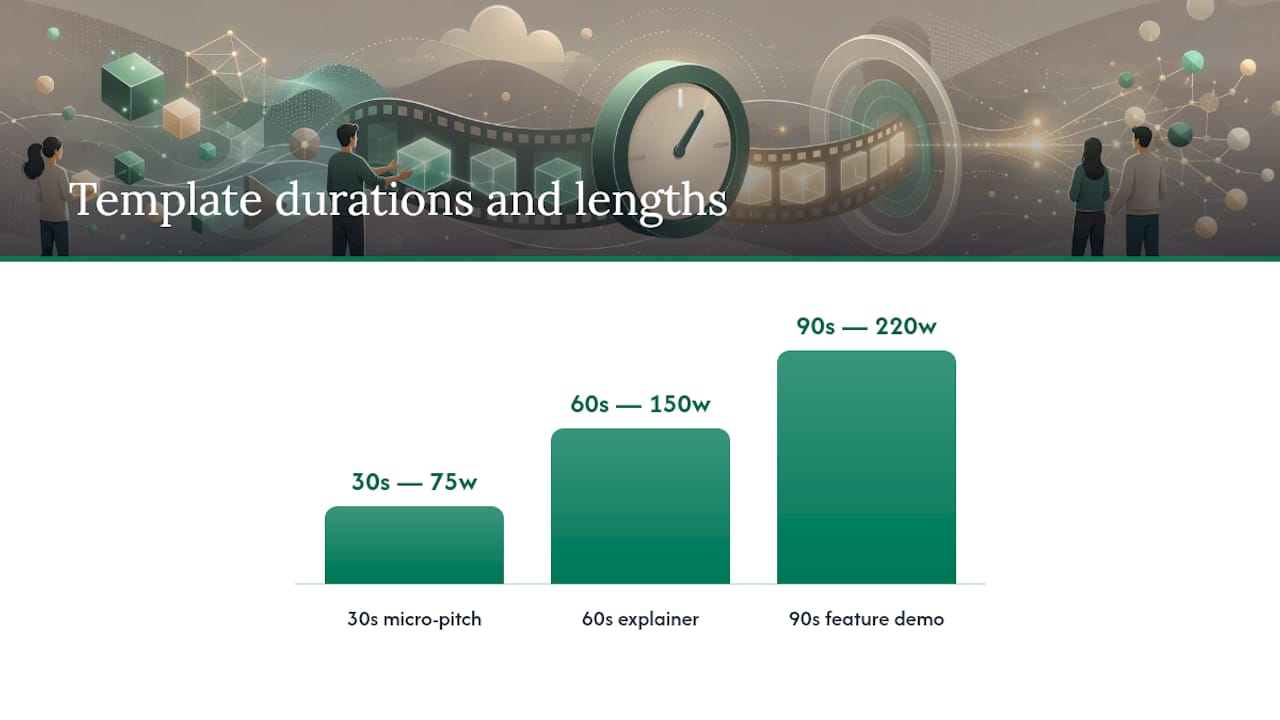
At natural delivery pace, a 30 second script runs about 75 spoken words. A 60 second script runs close to 150. A 90 second cut can push toward 220 to 240 words if the pacing stays tight, but that length only works for detailed demos or the middle video in a series, not a first-touch ad.
- 30 seconds: paid cold ads, UGC-style clips, retargeting
- 60 seconds: homepage hero video, organic short-form, LinkedIn
- 90 seconds: feature deep-dives, onboarding walkthroughs, series content
If your product has more than one core use case, don’t cram all of it into 90 seconds. Make three 30 second videos instead, each with its own hook and its own CTA, and label each one by the specific job it’s supposed to do.
Ready-to-Use SaaS Video Script Templates
Swap in your product name, your metric, and your audience line, and these run as written.
1. The 30-second micro-pitch (about 75 words)
Hook (0 to 5s): “Still exporting this to a spreadsheet every week?” Problem (5 to 12s): “Most teams lose two hours a week reconciling data by hand.” Solution (12 to 22s): “[Product] pulls it automatically and flags what changed.” Proof (22 to 27s): “Teams using it cut that to fifteen minutes.” CTA (27 to 30s): “Start free, no card required.”
2. The 60-second homepage explainer (about 150 words)
Hook (0 to 8s): Name the workflow pain in one sentence, no branding. Problem (8 to 18s): One added sentence on why the workaround fails at scale. Solution (18 to 40s): Screen capture of the product solving that exact step, narrated plainly. Proof (40 to 50s): One customer line or one number, nothing longer. CTA (50 to 60s): Trial link, restated clearly, on screen and spoken.
3. The 90-second feature demo (about 220 words)
Same arc, but the solution section splits into two sub-beats: the core action, then one secondary feature that removes an objection. Cut this template first if you ever need a 60 second version, that secondary feature beat is the one to drop.
A quick rule for trimming: cut adjectives before you cut nouns, and cut the second half of the proof line before the first. If a sentence describes how the product feels rather than what it does, it’s usually the first thing to go in a shorter cut.
For voiceover versus on-screen text, default to both for the hook and CTA, since those are the two moments a muted autoplay viewer needs to read instantly, and voiceover-only for the middle sections where a screen recording carries the visual weight.
How to Adapt One Script for TikTok, Shorts, and LinkedIn
Write one 60 second master script, then cut down instead of writing three scripts from scratch. Trim the middle, never the hook or CTA, those stay intact at every length.
TikTok and Shorts viewers scroll with sound off by default, so the first frame needs on-screen text carrying the hook’s meaning without audio. Vertical framing is non-negotiable, and captions should be burned in, not optional. LinkedIn viewers are more patient and more skeptical of hype, so a slightly longer, calmer voiceover with a specific metric in the proof beat tends to outperform a punchy TikTok-style cut.
- 60s master to 30s cut: drop the secondary proof sentence and tighten the solution demo to one screen action
- 30s cut to 15s cut: hook and CTA only, with a single mid-frame showing the product
- LinkedIn native upload: add a text overlay summarizing the CTA, since many viewers watch muted in a feed
- Thumbnail frame: choose the exact frame where the product UI is cleanest and most legible at small size
A small SaaS team can produce all three cuts from one recording session if the shot list plans for it upfront, which is worth doing before you ever hit record.
Common Mistakes in Short SaaS Scripts and How to Fix Them
The most frequent scripting mistakes are strikingly consistent across SaaS categories: overcomplicated language, no single clear audience, a missing or vague CTA, and scripts written without any thought to what’s on screen.
- Feature dump: swap the third feature line for a single pain-point sentence instead
- Weak hook: replace any sentence naming the product in the first five seconds with the workflow pain it removes
- Unclear CTA: name the exact action, “start your free trial,” not “learn more”
- Too many claims: cut every proof point but one; pick the most specific number you have
- Visual and voice mismatch: read the script aloud while watching the storyboard; if they diverge, rewrite the line, not the visual
Pro Tip: Test hooks and CTAs before touching production value. Small, fast A/B tests on the first five seconds tend to move conversion more than a better camera ever will.
Turning a Script Into a Storyboard Small Teams Can Actually Shoot
Mapping each line to a scene before recording avoids the expensive rework that comes from discovering mid-edit that a line has nothing to show on screen. A step-by-step script-to-storyboard approach keeps narration and visuals aligned from the first draft.
| Scene | Purpose | Visual | On-screen caption | Timing |
|---|---|---|---|---|
| 1 | Hook | Talking head or UGC style shot | Pain-point question | 0 to 8s |
| 2 | Problem | Screen recording of the manual workaround | One-line stat or pain restatement | 8 to 18s |
| 3 | Solution | Screen capture of product in action | Feature name, short | 18 to 40s |
| — | Proof | Text card or customer photo | Metric or short quote | 40 to 50s |
| 5 | CTA | Product logo or signup screen | “Start free” | 50 to 60s |
For visuals, use B-roll for the hook, live screen capture for the solution, and a simple animated overlay for proof if you don’t have a real customer clip yet. A solo creator’s gear checklist stays short: a decent lipstick-style microphone, a phone or webcam shot in good light, and a captioning tool, since captions are no longer optional on any platform your buyer scrolls through.
Tools and Workflow for Small Teams Writing Scripts at Scale
The workflow that keeps small teams consistent looks like this: brief, generate a draft, annotate it against the five-part arc, storyboard, record and edit, caption, then schedule. Skipping the annotation step is where most rework creeps back in.
AI-assisted drafting tools have cut time-to-first-draft significantly for teams writing at this pace, and a well-built content brief upfront reduces revision cycles more than any tool choice does. Categories worth having in the stack: a script generator for first drafts, a teleprompter app for recording, a lightweight editor, and a captioning tool. When prompting an AI tool for a draft, specify the audience role, the runtime, and the one proof point you want included, vague prompts produce vague scripts.
- Brief the pain point and audience role before generating anything
- Annotate the draft against hook, problem, solution, proof, CTA before storyboarding
- Schedule the shoot and the caption pass separately, they’re different skill sets
Pro Tip: Crontent’s research-backed drafts start from the same brief structure, so the script arrives already mapped to a sourced claim and your own brand voice, ready for the annotation step instead of a blank page.
Three Short SaaS Scripts You Can Copy Today
-
Onboarding simplifier (30s): Hook: “New users quitting before they finish setup?” Problem: one sentence on drop-off during onboarding. Solution: screen capture of a guided checklist inside the product. Proof: “Teams using guided onboarding cut setup time by half.” CTA: “Try it free at [product].com.”
-
Feature highlight (60s): Hook: name the specific manual task the feature replaces. Problem and solution run through the same screen recording. Proof: a single customer line on time saved. CTA: “Start your free trial.”
-
Social proof test for cold ads (45s): Hook: a pain question. Problem: brief. Solution: 15 seconds max. Proof: stretch to two sentences here, since this version is built to test how much social proof a cold audience needs before converting. CTA: trial link, repeated on screen.
Priorities for Solo Founders Writing Their Own Scripts
Speed beats polish at this stage. Ship a rough 30 second cut, measure whether the hook holds attention past five seconds, and only then invest in better visuals. Automation can draft the first pass, but someone on the team still has to read it aloud and check it sounds like your product, not a template. For a two-person team, one person owns the script and CTA, the other owns editing and captions, on a weekly cadence rather than a sporadic one.
— Jose
Get Research-Backed Scripts on a Schedule With Crontent
There are tools designed to help with generating scheduled, research-backed short video scripts alongside blog and social content, drafted from real sources and steered by the user’s brand voice, not generic templates. A small SaaS team can plug it straight into the workflow above, brief once, get a draft mapped to the hook, problem, solution, proof, CTA arc, then move directly to storyboarding instead of starting from scratch each time.

Every draft cites its sources and requires your review before anything ships, so nothing goes out sounding like it came from a bot instead of your own team. If your next priority is figuring out what content a small SaaS team should create first, scripts are often the fastest win because they compound across TikTok, Shorts, and LinkedIn from one draft. Check the Starter and Pro plans and start your first scheduled run.
Sources
- SaaS Explainer Video Script: Templates and Examples
- SaaS Video Script Writing: The 5-Part Framework That Converts Trials
- Top 5 mistakes to avoid when writing how-to video scripts for SaaS
- Ngram
FAQ
How Long Should a Short SaaS Video Script Be?
Most short SaaS videos run 30 to 60 seconds, with 60 to 120 seconds recommended for standard explainer and demo formats. A 30 second cut works best for cold ads and micro-pitches, while 60 to 90 seconds suits homepage or feature-demo content.
What Is the Best Script Structure for a SaaS Product Video?
The five-part hook, problem, solution, proof, call-to-action arc is the structure most conversion-focused SaaS scripts follow. It works because each beat qualifies or convinces the viewer before asking for the click.
Should a SaaS Video CTA Point to a Demo or a Free Trial?
For cold traffic, directing viewers to a free trial or self-serve signup often converts better than a demo request, which tends to work better for warmer, more qualified audiences. Save the demo ask for retargeting or sales-qualified audiences further down the funnel.
How Many Words Should a 30-Second Script Have?
A 30 second script typically contains around seventy-five spoken words at a natural delivery pace, while a 60 second script usually contains about 150 words, maintaining similar pacing.
Can Crontent Write Short Video Scripts for My SaaS Product?
Yes, Crontent generates scheduled, research-backed short video scripts alongside blog and social content, drafted in your brand voice with sources cited. Pricing for the Starter and Pro plans is available on the Crontent site.