168 Hour Audit: Reclaim Founder Time and Content in Three Weeks

Pick one framework, run a 168-hour time audit this week, then protect two or three deep-work blocks like they’re client meetings. Everything outside those blocks that isn’t customer conversations, product decisions, or a single metric that matters gets delegated, automated, or cut. That’s the whole playbook: audit, block, cut. The rest of this article just tells you how to run it.
TL;DR:
- Founders should eliminate non-essential reactive tasks, typically spending five to eight hours weekly on unnecessary interruptions, to reclaim deep work time.
- Running a 168-hour audit helps identify waste and guides ruthless cutting or delegation of non-urgent, non-essential activities outside core buckets.
- Prioritizing clear, measurable goals and filtering tasks against quarterly, weekly, and daily objectives prevents distraction by irrelevant meetings or requests.
- Effective time management relies on enforced calendar rules like labeling blocks, batching similar tasks, and limiting notifications to protect deep-work and recovery periods.
- Automating recurring tasks with precise SOPs and workflows, alongside strategic content drafts and review loops, supports sustained productivity without sacrificing voice or quality.
Table of Contents
- How to Allocate Your Week as a Founder
- What Methods Should You Try This Week?
- What Calendar Rules and Tools Actually Reduce Friction?
- How Do You Delegate and Automate Instead of Just Doing Less?
- What Weekly Ritual Keeps This from Falling Apart?
- Where Does Content Fit When You’re This Stretched?
- How Do You Set Goals That Actually Shape Your Calendar?
- How Do You Say No Without Damaging Relationships?
- What Does Work-Life Balance Actually Look Like for Founders?
- The Real Standard Isn’t a Perfect Calendar
- Reclaim Your Content Hours Without Losing Your Voice
- Sources
- FAQ
How to Allocate Your Week as a Founder
Every founder’s week breaks into four buckets: build, sell, lead, and recover. Build is product and engineering work. Sell is anything touching revenue: sales calls, customer interviews, pricing decisions. Lead is the people and operations work of running a company. Recover is sleep, exercise, and the mental space that keeps you from making bad decisions on the fourteenth hour of a workday.
Most founders default to a fifth, invisible bucket: reactive noise. Slack pings, “quick calls,” inbox triage that eats the exact hours you meant for deep work. If reactive time exceeds 20% of your week, you have a delegation problem, not a discipline problem. That’s your signal to stop and rebuild the schedule, not to try harder at ignoring notifications.
The 80/20 rule is the fastest filter for deciding what deserves a block. A 2025 review of 107 studies on time management strategies found that prioritization and structured planning consistently beat generic “work harder” advice for both output and wellbeing.
- Direct customer conversations, especially with your first 50 users
- The one product decision that unblocks your team this week
- The single metric that tells you if the business is actually working
Pro Tip: If you can’t name your one metric right now, that’s the real problem. Fix that before you touch your calendar.
What Methods Should You Try This Week?
Strategy without a method is just a mood. Here’s how to turn “manage my time better” into something you can actually run by Friday.
- Run a 168-hour audit. Log every hour for one week, in 30-minute increments, using whatever’s fastest for you, a notes app, a spreadsheet, even a paper grid. Group entries into build, sell, lead, recover, and reactive at the end of the week, not as you go.
- Turn the audit into a cut list. Anything under “reactive” that isn’t a genuine emergency becomes a candidate for elimination or delegation. Be ruthless here; most founders find 5 to 8 hours of pure waste on the first pass.
- Apply the Eisenhower Matrix daily. Sort tasks into urgent/important quadrants each morning. Anything that’s neither urgent nor important gets deleted, not scheduled.
- Pair time-blocking with Pomodoro sprints. Block the calendar hour first, then work it in 25-minute Pomodoro sprints with 5-minute breaks to keep focus from decaying mid-block.
- Eat the frog first. Whatever task you’re most tempted to avoid goes into your first deep-work block of the day, before email, before Slack.
Pick one of these to layer on top of blocking and stick with it for three weeks before judging it. Switching methods every few days is the single fastest way to feel busy and produce nothing measurable.
What Calendar Rules and Tools Actually Reduce Friction?
Time-blocking only works if the calendar enforces it instead of just describing it. A handful of rules make the difference between blocks that hold and blocks that dissolve the moment someone pings you:
- Block deep-work time before anyone asks for a meeting, not after your calendar is already full.
- Label blocks by bucket (“Build,” “Sell,” “Recover”) so you and your team see intent at a glance.
- Set notification windows, checking Slack and email only at fixed times, rather than letting them interrupt blocks in real time.
- Batch similar work: all customer calls on one or two days, all admin in a single afternoon, all content writing in one sitting.
One founder profiled by Inc. credits disciplined time-blocking, writing every commitment down and defending the block, as a core habit behind scaling a nine-figure business. For tools, look for three categories: a calendar and scheduling app that handles external booking without back-and-forth emails, a focus timer for Pomodoro sprints, and a lightweight task manager that doesn’t require a training manual. The best combination is the one with the least setup friction, not the one with the most features.
How Do You Delegate and Automate Instead of Just Doing Less?
Delegation fails when founders hand off tasks instead of outcomes. Telling someone “answer support tickets” invites constant check-ins; telling them “keep first-response time under two hours and escalate anything billing-related” gives them a target they can own without you.
- Record a Loom walking through how you currently do the task.
- Feed the transcript to an AI tool to draft a standard operating procedure.
- Refine the SOP once with the person taking it over, then let it run.
For recurring content and admin work, ask a simple question before automating: does this require your judgment, or your voice? If it needs neither, automate it outright. If it needs your voice but not your judgment on every instance, a workflow automation setup with a human review step is usually the right middle ground.
Pro Tip: Take your top 20 recurring weekly tasks and sort each into kill, automate, delegate, or keep. Most founders find at least a third belong in the first two columns, but give yourself two weeks to actually move each one before checking results.
What Weekly Ritual Keeps This from Falling Apart?
Every Sunday, spend 15 to 20 minutes reviewing the prior week against your four buckets. Note where reactive time crept above 20%, block your highest-focus hours for build or sell work before anything else lands on the calendar, and pick one specific win you want by next Sunday, not a vague intention.
Leader self-reflection research from Kellogg shows structured reflection improves both decision quality and how well leaders align their time with actual priorities, not just perceived ones.
Track three numbers weekly:
- Percentage of hours in true deep work
- Percentage of hours that were reactive or unplanned
- If you’re pre-product-market-fit, the share of hours spent in direct customer conversations
A meta-analysis of over 53,000 participants found time management practices produce a moderate boost to job performance and a considerably larger boost to wellbeing, the kind of compounding effect that shows up more in month three than in week one. Reassess your bucket ratios every four to six weeks as the business changes.
Where Does Content Fit When You’re This Stretched?
Content is one of the few founder tasks that’s both genuinely high-leverage and genuinely time-expensive, which is exactly why it gets skipped first when a week goes sideways, so learning how SEO and content marketing work together can help prioritize effectively. The same meta-analysis on time management linking planning behaviors to wellbeing applies directly here: an unplanned content backlog creates the same low-grade stress as an unplanned inbox.
A draft-review loop fixes the friction without cutting content entirely. One automated, source-cited draft lands per week; you spend a single focused 30 to 60 minute session reviewing and adding your actual take before anything publishes. That’s the model Crontent operationalizes:
- Research-backed drafts pulled from current sources, not generic filler
- Your voice and opinions preserved, not flattened into stock phrasing
- No auto-publishing, every draft waits for your review
- Fits directly into a Sunday planning ritual as one recurring line item
Treat the review session as its own labeled block, not a task squeezed between meetings.
How Do You Set Goals That Actually Shape Your Calendar?
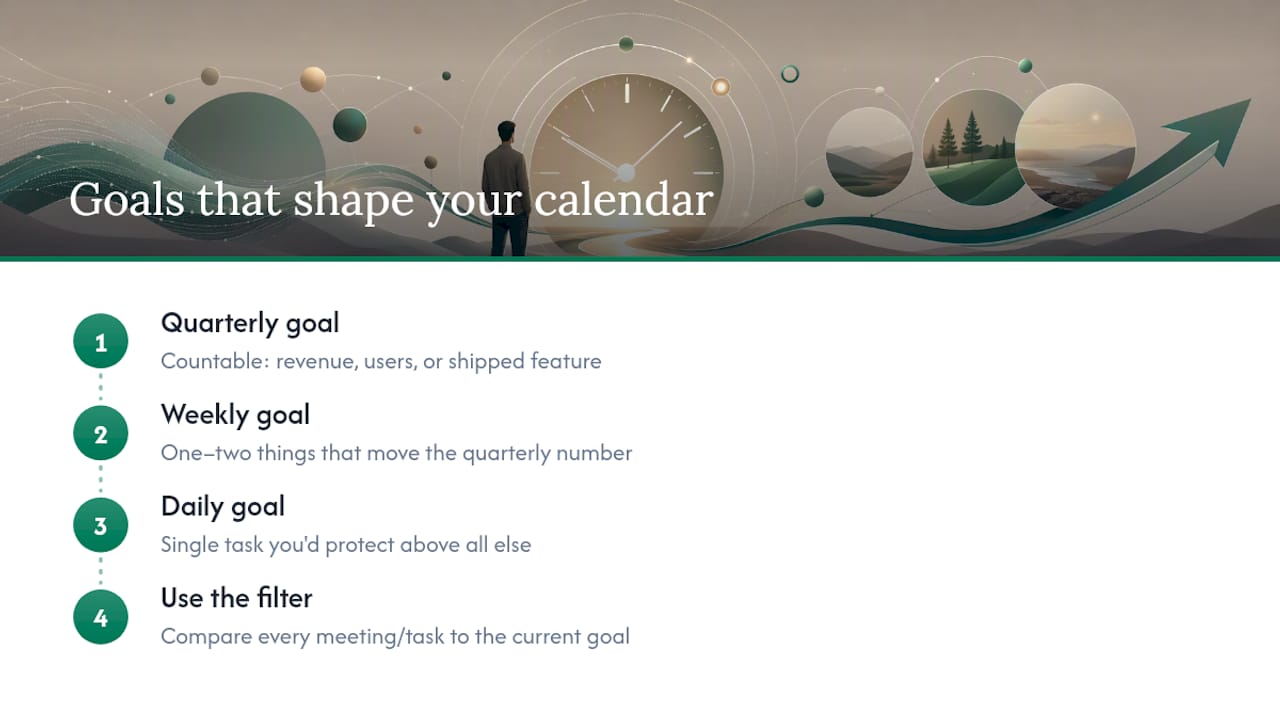
Vague goals produce vague calendars. “Grow the business” tells you nothing about which meeting to take Tuesday morning; “get 10 new paying customers by month end” tells you exactly which hours matter.
The Frontiers review of 107 studies found goal-setting and prioritization training produced measurable gains in both productivity and wellbeing across workplace settings, not just in theory. The mechanism is simple: a specific goal lets you test every task on your calendar against a real question, does this move the goal, or doesn’t it?
Set goals at three layers. Quarterly goals should be countable: revenue, users, a shipped feature, not “improve engagement.” Weekly goals should be the one or two things that most directly move the quarterly number. Daily goals should be the single task you’d protect even if the whole day caught fire.
Write the quarterly goal somewhere you’ll actually see it, not buried in a doc you open twice a year. Some founders put it at the top of their weekly planning note; others tape it above the monitor. The format matters less than the visibility.
When a meeting request or task shows up, hold it against the current goal before accepting. If it doesn’t connect, even loosely, it’s a candidate for the reactive bucket, and reactive is what you’re trying to shrink. This single filter does more to protect a calendar than any app or planner ever will, because it turns a scheduling decision into a strategic one.
How Do You Say No Without Damaging Relationships?
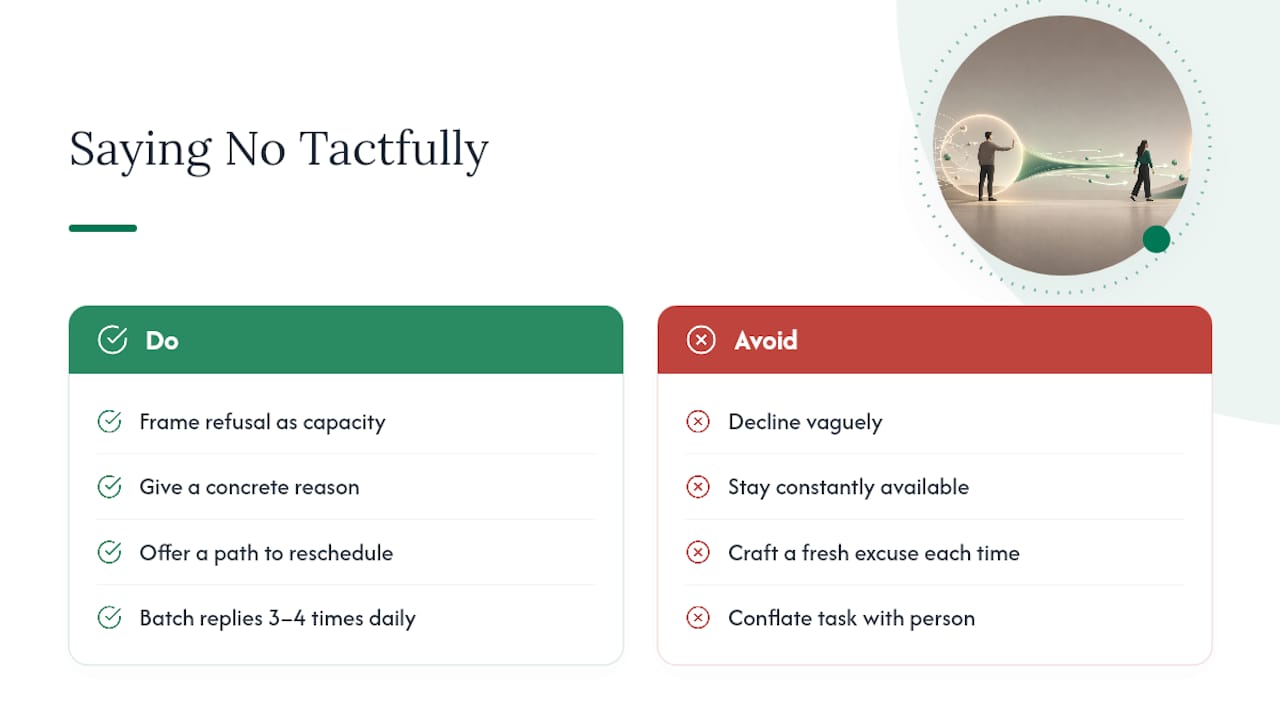
Every unprotected calendar slot eventually gets claimed by someone else’s priority. Saying no isn’t rude, it’s the only mechanism that keeps your calendar aligned with your own goals instead of everyone else’s.
The easiest way to say no without friction is to make the refusal about your capacity, not about the person. “I can’t take this on this week, my focus is on closing the enterprise deal” lands better than a vague decline, because it gives the other person a real reason and often a path to reschedule.
Interruptions are a slightly different problem from requests, and they need a different fix: batching your responsiveness instead of staying constantly available. Check Slack and email at three or four set times a day rather than the moment a notification appears. Most messages aren’t actually urgent; they just feel urgent because they’re visible.
For recurring requests, meetings, status updates, “quick calls”, build a standard response before you need one. A short, polite template you can send in ten seconds beats crafting a fresh explanation every time, and it removes the decision fatigue that makes founders cave into “just this once.”
One more distinction worth making: saying no to a task is different from saying no to a person. You can decline the coffee chat while still being generous with a two-line email answer. Founders who protect their calendars well tend to be precise about what they’re declining, not blanket-unavailable.
What Does Work-Life Balance Actually Look Like for Founders?
Founders rarely have clean boundaries between “work” and “life,” and pretending otherwise usually backfires. What actually works is protecting specific, non-negotiable blocks for recovery the same way you protect deep-work blocks, rather than hoping rest happens in whatever time is left over.
Recovery isn’t just sleep, though sleep matters more than most founders admit. It’s the buffer that keeps decision-making sharp: exercise, meals that aren’t eaten at a desk, and actual time with the people who aren’t your cofounder or your customers. Skipping recovery doesn’t create more working hours, it just quietly degrades the quality of every hour you do work.
A practical rule: if your calendar shows zero recovery blocks in a given week, treat that as a warning sign equal to a blown revenue number. Both mean something in the system is broken.
Founders who sustain multi-year builds tend to share one habit: they treat their own capacity as a resource to manage, not an inexhaustible input. That means occasionally saying no to a growth opportunity that would come at the cost of burnout, and it means being honest with cofounders and early employees about what’s sustainable versus what’s a short-term sprint. A four-bucket week that never leaves room for “recover” isn’t ambitious, it’s a countdown to a worse decision made on too little sleep.
The Real Standard Isn’t a Perfect Calendar
Guard your green blocks the way you’d guard a paying customer’s contract, because losing that focus time costs you just as much, even if the invoice never shows it. Most founders I’ve seen study this chase a perfectly color-coded calendar and burn out trying to maintain it. The better standard is smaller: did this week look slightly better than last week?
Small, compounding wins beat calendar perfectionism every time. Skip a Sunday review and the system doesn’t collapse, it just resets a little slower. Start with a 20-minute Sunday audit this week: four buckets, one number that moved, one block you’ll defend harder next week. That’s the entire habit worth building first.
— Jose
Reclaim Your Content Hours Without Losing Your Voice
If content writing is the task that keeps sliding into your reactive bucket, Crontent exists to pull it back out. Instead of blocking two or three hours to write a post from scratch, you review one research-backed, source-cited draft that already sounds like you, because the system is built around your actual takes, not generic filler.

The experiment is simple: delegate one weekly draft to Crontent, then set aside a single 30 to 60 minute review session, the same slot you’d already use for weekly planning, to add your edits and your opinion before anything goes out. No auto-publishing, so nothing leaves your control without a look first. If you’re weighing whether to prioritize content at all this quarter, a piece like what content a small SaaS team should create first is worth reading before you commit the hours. When you’re ready to test the workflow, the Starter and Pro plans are both available to evaluate against your own weekly review block.
Sources
- Does time management work? A meta-analysis — NCBI
- Systematic review of time management strategies — Frontiers in Education (2025)
- Eisenhower Matrix — Columbia SPS
- How self-reflection can make you a better leader — Kellogg Insight
FAQ
What Is the 3-3-3 Rule for Time Management?
The 3-3-3 rule structures a workday into three hours of focused deep work, three shorter urgent tasks, and three quick maintenance items like email or admin, giving founders a simple template for balancing depth and upkeep in a single day.
What Are the 5 P’s of Time Management?
Common versions cite Plan, Prioritize, Practice, Perform, and Prevent (procrastination), though the exact list varies by source; the consistent theme across frameworks is planning and prioritization first, execution second.
What Is Elon Musk’s Time Management Method?
Musk has described breaking his day into five-minute blocks to eliminate wasted transition time between tasks, an extreme version of the time-blocking principle this article recommends applying more moderately, in hour-long blocks rather than five-minute ones.
What Are the 7 Key Elements of Time Management?
Definitions vary across sources, but the elements that consistently show up are goal setting, prioritization, planning, scheduling or time-blocking, delegation, avoiding procrastination, and regular review, all of which this article covers directly.
How Can Founders Reduce Content Writing Time Without Losing Quality?
A draft-review loop, one automated, source-cited draft followed by a single focused review session, cuts the hours founders spend writing from scratch; Some content automation platforms offer plans built specifically around that workflow.